
Download Jobbyo – AI‑Powered Job Application Manager, Free & Secure
Overview – Why Jobbyo Is Changing the Job‑Search Landscape
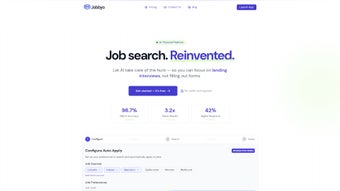
In a market where the average job seeker submits dozens of applications each month, managing resumes, cover letters, and job‑board alerts can feel overwhelming. Jobbyo steps into this chaos as an AI‑driven web application that automates the most time‑consuming parts of the hiring pipeline. By leveraging natural‑language processing and smart matching algorithms, Jobbyo formats your resume to meet industry standards, crafts personalized cover letters in seconds, and continuously scans major job boards for openings that align with your skill set.
The platform is built for anyone who wants to apply to multiple positions simultaneously without sacrificing quality or organization. Whether you’re a recent graduate, a mid‑career professional, or a seasoned executive, Jobbyo centralizes every application, tracks its status, and sends reminders for follow‑ups. The result is a smoother, less stressful experience that lets you devote more energy to interview preparation and networking.
Because the tool runs entirely in a browser, there’s no need for heavyweight installations, and it works on any device that supports JavaScript. In short, Jobbyo is more than a resume builder; it’s a strategic assistant that turns a fragmented job hunt into a cohesive, data‑driven process.
Key Features That Set Jobbyo Apart
- AI Resume Optimizer: Upload a draft and let Jobbyo restructure it for ATS compatibility, keyword density, and visual appeal.
- Instant Cover Letter Generator: Answer a few prompts and receive a custom cover letter tailored to each job posting.
- Smart Job Board Scraper: The tool continuously monitors LinkedIn, Indeed, Glassdoor, and niche boards for matches based on your profile.
- Application Tracker Dashboard: A unified view of all submitted applications, upcoming deadlines, and interview invitations.
- Interview Prep Insights: Jobbyo aggregates common interview questions for the targeted role and suggests talking points.
- Multi‑Language Support: Write resumes in English, Spanish, French, or German and let the AI translate while preserving nuance.
- Secure Cloud Storage: All documents are encrypted at rest and in transit, meeting GDPR and CCPA standards.
- Free Tier & Premium Upgrade: Core automation is free; the premium plan adds unlimited job alerts, priority support, and advanced analytics.
These capabilities combine to reduce the average time spent per application from 45 minutes to under 5 minutes. The AI models are continuously updated, ensuring that the latest hiring trends and keyword strategies are incorporated automatically. Users also benefit from a clean, ad‑free interface that focuses on productivity rather than distractions. By centralizing the entire workflow, Jobbyo eliminates the need for multiple third‑party tools, saving both money and mental bandwidth.
Installation, Usage & Compatibility – Getting Started in Minutes
How to Install and Set Up Jobbyo
Jobbyo is a web‑based solution, so there’s no traditional “installation” process. To begin, navigate to jobbyo.com, click the “Sign Up Free” button, and create an account using your email or a social login. The onboarding wizard guides you through uploading an existing resume, selecting your preferred job titles, and linking your favorite job boards. Because the platform runs entirely in the browser, you only need a stable internet connection and a modern browser that supports JavaScript (Chrome, Edge, Firefox, Safari). After registration, you’ll receive a verification email; once confirmed, the dashboard appears instantly.
Step‑by‑Step Usage Guide
1. Upload Your Current Resume: Drag‑and‑drop a PDF or DOCX file. Jobbyo’s AI scans the content, extracts key sections, and suggests improvements.
2. Create a Cover Letter Template: Answer three quick prompts about the role, company culture, and your unique selling points. The AI drafts a polished letter that you can edit or reuse.
3. Set Job Preferences: Choose industries, locations, salary ranges, and remote‑work options. Jobbyo will tailor its job‑board searches accordingly.
4. Launch the Smart Search: Click “Find Jobs” and watch as Jobbyo pulls listings from multiple sources, ranks them, and offers one‑click apply where possible.
5.
Track Applications: Each submission appears on the Tracker with status markers (Submitted, Interview, Offer, Rejected). Set reminders for follow‑up emails directly from the dashboard.
Supported Operating Systems
Because Jobbyo is browser‑based, it works on Windows 10/11, macOS Ventura and later, Linux distributions with a modern browser, as well as mobile platforms (Android 8+ and iOS 13+). The responsive design ensures a seamless experience whether you’re on a desktop, tablet, or smartphone.
Pros and Cons
- Pros:
- Fully automated resume and cover letter creation.
- Real‑time job board aggregation saves hours of manual searching.
- Secure, encrypted cloud storage protects personal data.
- Free tier provides substantial functionality for entry‑level users.
- Responsive design works across all major operating systems.
- Cons:
- Premium features (unlimited alerts, advanced analytics) require a subscription.
- Relies on an internet connection; offline usage is not supported.
- AI suggestions may need manual tweaking for highly specialized industries.
Frequently Asked Questions About Jobbyo
Is Jobbyo really free to use?
Yes, Jobbyo offers a robust free tier that includes AI resume formatting, cover‑letter generation, and up to 20 job alerts per month. Premium plans unlock unlimited alerts, deeper analytics, and priority support, but the core automation remains free.How does Jobbyo ensure my data is secure?
All user data is encrypted both in transit (TLS 1.3) and at rest (AES‑256). Jobbyo complies with GDPR and CCPA regulations, and the company conducts regular security audits to protect personal information.Can I use Jobbyo on my mobile phone?
Absolutely. The platform is fully responsive and works on Android 8+ and iOS 13+. All core features—including resume editing, job search, and application tracking—are accessible from a mobile browser.What happens if I don’t have JavaScript enabled?
Jobbyo’s AI engine and dynamic dashboard rely on JavaScript. Without it, the site will load a basic static page but none of the automation or tracking features will function.How often are the AI models updated?
The development team pushes model updates weekly to incorporate the latest hiring trends, keyword shifts, and language nuances, ensuring that users always benefit from state‑of‑the‑art suggestions.Conclusion – Streamline Your Job Hunt with Jobbyo Today
If you’re tired of juggling multiple spreadsheets, copy‑pasting resumes, and missing deadlines, Jobbyo offers a single, AI‑powered hub that takes the grunt work out of job hunting. Its free tier already delivers enough automation to cut application time by over 80 %, while the premium upgrade scales with ambitious professionals who need unlimited alerts and deeper analytics. Because the service runs in any modern browser, you can start instantly on Windows, macOS, Linux, Android, or iOS—no downloads, no installations, just a secure, efficient workflow. Give Jobbyo a try, streamline your applications, and focus on what really matters: preparing for interviews and landing your next career move.
Download Jobbyo now and experience the future of job application management.






